If you’re exploring email marketing tools in 2026, chances are you’ve come across ConvertKit—now rebranded simply as Kit.
Known for its creator-first approach, Kit has evolved into one of the most popular platforms for building, nurturing, and monetizing an audience without needing advanced technical skills.
But with so many email marketing tools available today, the real question is:
Is ConvertKit (Kit) still worth it in 2026?
In this complete ConvertKit review, we’ll break down everything you need to know—from pricing and features to automation, comparisons, and alternatives—so you can decide if it’s the right tool for your business.
If your goal is to grow a newsletter, sell digital products, or build a personal brand, this review will help you make a confident decision.
What is ConvertKit (Kit)?
ConvertKit—now called Kit—is an email marketing platform built specifically for creators, bloggers, and online entrepreneurs.
This convertkit review focuses on how the platform helps creators grow and monetize their audience.
Unlike traditional email marketing tools that focus heavily on complex dashboards and corporate workflows, Kit is designed to help you:
- Build a loyal audience
- Create meaningful email relationships
- Monetize your content directly
In practice, most creators use Kit to run newsletters, sell digital products, and automate their email funnels without needing technical skills.
What is ConvertKit used for?
Kit is more than just an email sender—it’s a complete audience-building and monetization system.
Here’s what you can do with it:
- Email newsletters – Send broadcasts to your audience
- Lead generation – Create forms and landing pages to capture emails
- Email automation sequences – Build welcome sequences, funnels, and drip campaigns
- Sell digital products – Courses, ebooks, and paid newsletters
- Subscriber tagging & segmentation – Personalize emails based on behavior
Example:
If someone clicks your “SEO course” link, you can tag them as SEO interest and later send targeted offers—this is where ConvertKit becomes powerful.
How Does ConvertKit Work?
One of the biggest reasons creators choose Kit is its tag-based system, which is far more flexible than traditional list-based email tools.
Instead of managing multiple lists (which can get messy and expensive), Kit allows you to:
- Send highly targeted emails
- Tag subscribers based on actions
- Segment audiences dynamically
Basic workflow:
- Create a ConvertKit account (signup)
- Access your ConvertKit dashboard
- Build a form or landing page
- Collect subscribers
- Tag users based on behavior
- Send emails or automation sequences
From experience, this system is much easier to manage than traditional list-based tools.
Key Features of ConvertKit (Kit)
ConvertKit (now Kit) is built for creators who want a simple but powerful system to grow and monetize their audience. Its features focus on automation, segmentation, and ease of use.
These convertkit features are designed to help creators automate and scale their email marketing.
Below is a detailed breakdown of its core features and how they help in real-world scenarios.
1. Email Automation
Email automation is one of the most powerful features of Kit. It allows you to create workflows that run automatically and engage subscribers at the right time.
Key capabilities:
- Visual automation builder
- Behavior-based triggers (clicks, signups, purchases)
- Tag-based workflows
For example, when someone downloads your lead magnet, they can automatically enter an email sequence that nurtures them and promotes your product.
This helps you build automated funnels that generate engagement and sales without constant manual effort.
2. Landing Pages and Forms (Lead Generation Engine)
Kit provides built-in tools to create landing pages and signup forms, which are essential for growing your email list.
Features include:
- Drag-and-drop builder
- Pre-designed templates
- WordPress integration
- Mobile-responsive design
You can create:
- Inline forms for blog posts
- Popups for higher conversions
- Full landing pages for campaigns
This makes it easy to capture leads without needing additional tools or technical skills.
3. Subscriber Tagging (Smart Segmentation)
Instead of using multiple lists, Kit uses a tagging system to manage subscribers more efficiently.
Benefits of tagging:
- Organize subscribers based on behavior
- Create highly targeted campaigns
- Avoid duplicate contacts
Example tags:
- Downloaded ebook
- Clicked product link
- Interested in a specific topic
This allows you to send personalized emails, which improves engagement and increases conversion rates.
4. Creator Commerce
Kit includes built-in monetization features that allow you to sell directly to your audience.
You can:
- Sell digital products such as ebooks and courses
- Offer paid newsletters
- Accept payments through built-in integrations
This eliminates the need for third-party tools and simplifies the process of earning from your email list.
5. Email Broadcasts
Email broadcasts are used to send one-time messages to your subscribers.
Key features:
- Simple email editor
- Audience targeting using tags
- A/B testing for subject lines
You can use broadcasts for:
- Newsletters
- Announcements
- Product launches
A/B testing helps improve open rates and ensures better performance over time.
ConvertKit Pricing (2026 Plans & Cost Breakdown)
ConvertKit offers a relatively simple pricing structure compared to many other email marketing tools. However, like most platforms in this space, the cost increases as your subscriber list grows.
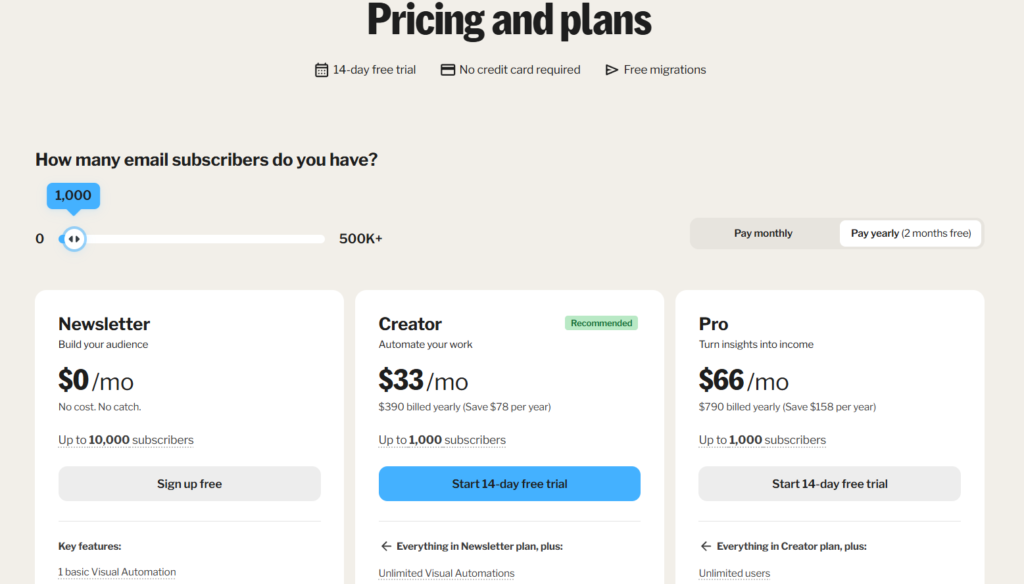
This makes it beginner-friendly at the start, but something to evaluate carefully as you scale.
| Plan | Price (Starting) | Subscribers Limit | Key Features |
|---|---|---|---|
| Newsletter Plan | $0/month | Up to 1,000 | Email broadcasts, forms, landing pages, limited automation |
| Creator Plan | From $33/month | Scales with list size | Visual automation builder, email sequences, integrations, segmentation |
| Pro Plan | Higher-tier pricing | Scales with list size | Advanced reporting, subscriber scoring, priority support |
Newsletter Plan — Free
The free plan is a good starting point for new creators who want to test the platform without any upfront investment.
Includes:
- Up to 1,000 subscribers
- Basic email broadcasts
- Signup forms and landing pages
- Limited automation features
This plan is ideal if you are just starting a blog, newsletter, or side project and want to build your first email list.
Creator Plan — From $33/month
The Creator plan unlocks the core functionality that makes Kit powerful for automation and growth.
Starts at:
- Around $33 per month (pricing increases with subscribers)
Includes:
- Visual automation builder
- Email sequences and funnels
- Third-party integrations
- Advanced audience segmentation
This is the most popular plan and is suitable for creators who are actively growing their audience and want to automate their email marketing.
Pro Plan — From $66/month
The Creator Pro plan is designed for advanced users who need deeper insights and premium support.
Includes:
- Advanced reporting and analytics
- Subscriber scoring
- Priority customer support
- More detailed performance tracking
This plan is best for creators who are already generating revenue and want to optimize their campaigns further.
Is ConvertKit Worth the Price?
ConvertKit may not be the cheapest email marketing tool, but it offers strong value for creators.
It is worth it if you:
- Want built-in automation without complexity
- Plan to sell digital products or newsletters
- Need a system focused on creators rather than businesses
It may not be ideal if you:
- Only need basic email sending at the lowest cost
- Run a large eCommerce store with complex needs
ConvertKit Pros and Cons
Before choosing any email marketing tool, it’s important to understand both the strengths and limitations. ConvertKit (now Kit) is highly regarded, but it may not be the perfect fit for everyone.
This convertkit review highlights both the strengths and limitations to help you make an informed decision.
Pros
- Beginner-friendly interface that is easy to navigate
- Powerful automation system with visual workflows
- Built specifically for creators, bloggers, and solopreneurs
- Clean and minimal dashboard with no unnecessary complexity
- Strong tagging and segmentation for personalized emails
- Built-in tools for selling digital products
These advantages make Kit especially appealing for users who want a simple setup without sacrificing core marketing capabilities.
Cons
- Pricing increases quickly as your subscriber list grows
- Limited design flexibility compared to some competitors
- Not a full CRM for advanced sales pipeline management
- Fewer advanced features for large-scale enterprise needs
While these drawbacks may not affect beginners, they can become important as your business scales.
ConvertKit Tutorial (Step-by-Step Setup Guide)
In this convertkit tutorial, getting started with ConvertKit (now Kit) is surprisingly simple—even if you’ve never used an email marketing tool before.
One of the biggest advantages of Kit is its clean interface and beginner-friendly workflow, which allows you to go from zero to sending emails in under an hour.
Let’s walk through the exact steps to get your first email system up and running.
Step 1: Create a ConvertKit Account
- Sign up for a free account
- Enter basic details (name, email, business type)
- Access your Kit dashboard
The dashboard is minimal and distraction-free, which makes it much easier to navigate compared to more complex tools.
Pro tip: Start with the free plan to test features before upgrading.
Step 2: Create a Form or Landing Page
This is how you start collecting subscribers.
You’ll have three options:
- Inline forms → Embed inside blog posts
- Popups → Capture attention on your website
- Landing pages → Standalone pages for lead generation
Setup process:
- Choose a template
- Customize colors, text, and branding
- Add a lead magnet (e.g., free ebook, checklist, mini-course)
Lead magnets significantly increase conversion rates—don’t skip this step.
Example:
- “Free SEO Checklist”
- “7-Day Email Course”
Step 3: Set Up an Email Sequence (Automation)
This is where Kit really shines.
Instead of sending emails manually, you can create automated sequences that run in the background.
How to set it up:
- Go to “Sequences”
- Create a new sequence
- Add emails in order
Example structure:
- Day 1 → Welcome email
- Day 3 → Value content
- Day 5 → Product or offer
This allows you to build trust and sell automatically without constant effort.
Step 4: Use Tags for Smart Segmentation
Unlike many tools, Kit uses a tag-based system instead of lists.
This means you can track subscriber behavior and personalize emails.
Example tags:
- “Downloaded ebook”
- “Clicked sales link”
- “Interested in SEO”
Why this matters:
- Send targeted emails
- Improve engagement
- Increase conversions
Better targeting = higher open rates + more sales.
Step 5: Send Your First Email (Broadcast)
Once your setup is ready, you can send a one-time email (called a broadcast).
Steps:
- Go to “Broadcasts”
- Select your audience (or segment)
- Write your email
- Click send (or schedule)
Broadcasts are perfect for newsletters, announcements, and promotions.
ConvertKit Reviews & Ratings (2026)
Overall, ConvertKit continues to receive strong feedback from users, particularly within the creator community. Most convertkit reviews highlight ease of use and automation as its biggest strengths.
Overall Rating: ⭐ 4.5/5
Is ConvertKit good?
Yes, ConvertKit (Kit) is a strong choice—especially for creators who want a balance between simplicity and functionality.
It is particularly well-suited for:
- Bloggers building an email list
- YouTubers and content creators
- Coaches and course sellers
- Newsletter-based businesses
It may not be ideal for:
- Advanced marketers who need highly complex automation systems
- Large businesses needing a full CRM
- Users looking for the cheapest email marketing tool
ConvertKit vs Mailchimp
When comparing ConvertKit with Mailchimp, the key difference comes down to target audience and usability.
| Feature | ConvertKit (Kit) | Mailchimp |
|---|---|---|
| Ease of use | Very simple | Moderate |
| Automation | Advanced | Basic |
| Segmentation | Tag-based | List-based |
| Best for | Creators | Businesses |
Key Differences
- ConvertKit focuses on simplicity and creator workflows
- Mailchimp offers more traditional marketing tools for businesses
- Tag-based systems in Kit allow more flexible segmentation
Verdict
ConvertKit is the better choice for creators who want simplicity and automation. Mailchimp is more suitable for traditional businesses that need broader marketing features.
Clickfunnels vs ConvertKit
Comparing ConvertKit with ClickFunnels highlights two very different tools.
| Feature | ConvertKit | Clickfunnels |
|---|---|---|
| Email marketing | Strong | Basic |
| Funnels | Limited | Advanced |
| Pricing | Affordable | Expensive |
Verdict:
- Use ConvertKit if your main focus is email marketing and automation
- Use Clickfunnels if you need advanced funnel building and sales pages
ConvertKit Alternatives (Best Options)
If ConvertKit is not the right fit, there are several strong alternatives depending on your needs.
1. MailerLite
- Budget-friendly pricing
- Beginner-friendly interface
- Good for simple email marketing needs
Best for users who want an affordable and easy-to-use platform.
2. ActiveCampaign
- Advanced automation workflows
- Built-in CRM features
- Deep segmentation capabilities
Best for users who need powerful automation and sales pipeline management.
3. GetResponse
- All-in-one marketing platform
- Includes webinars and funnels
- Strong automation features
Best for users who want more than just email marketing.
Is ConvertKit a CRM?
Not exactly.
While ConvertKit has CRM-like features (tags, segmentation), it’s primarily an email marketing platform, not a full CRM like HubSpot or Salesforce.
Common ConvertKit Questions
Is ConvertKit down?
Rarely. The platform is known for strong uptime and reliability.
How to send an email in ConvertKit?
- Go to Broadcasts
- Select audience
- Write email
- Hit send
How to embed ConvertKit form into WordPress?
- Use the official plugin or embed code
- Paste the form into your page or post
- Publish and start collecting emails
Final Verdict: Is ConvertKit (Kit) Worth It?
Based on this Convertkit review, ConvertKit (Kit) remains one of the best email marketing tools for creators in 2026.
Best for:
- Bloggers
- YouTubers
- Course creators
- Solopreneurs
Not ideal for:
- Large enterprises
- Businesses needing a full CRM
Bottom line:
If your goal is to build an audience, nurture relationships, and monetize through email marketing, ConvertKit (Kit) is a strong and reliable choice.
It combines ease of use with powerful automation, making it especially valuable for creators who want results without complexity.