You’ve been posting consistently. The content is good. The follower count slowly ticks up.
And then one morning the algorithm changes, the platform tweaks its rules, or your account gets flagged for a reason no one can clearly explain — and months of work become invisible overnight.
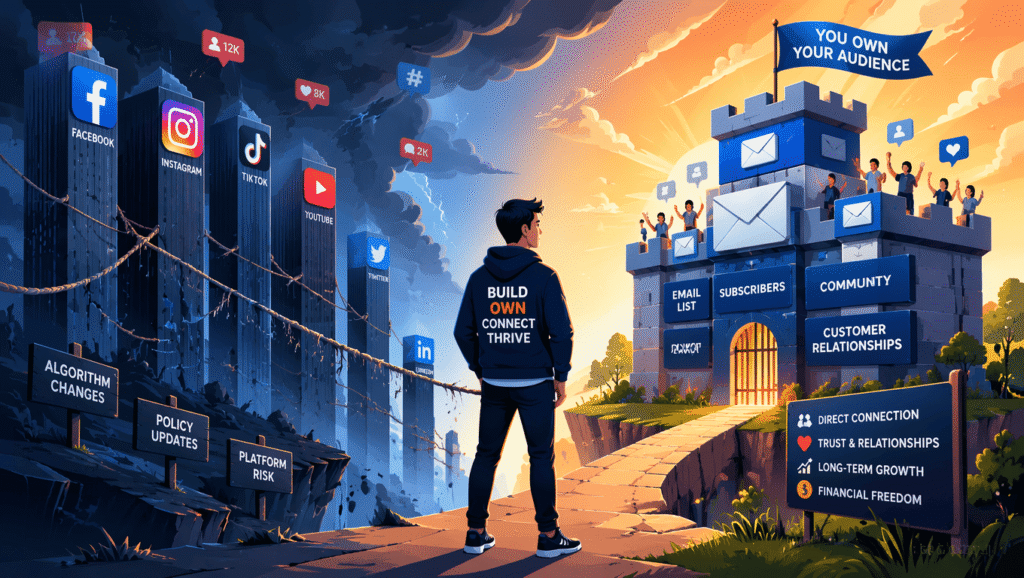
This is the experience most creators go through at some point. Not because they did something wrong. But because they built on rented land.
This audience growth strategy guide is about building on land you own. You will learn how to build an audience online massive following across the platforms you already use, and then systematically secure that audience in a place no algorithm update, sudden ban, or policy decision can ever reach.
The Difference Between Renting an Audience and Owning One
When you grow followers on Instagram, YouTube, TikTok, LinkedIn, or any social platform, you do not own that audience. The platform does.
They decide who sees your content, when they see it, and what terms you’re allowed to operate under. They can change those terms at any time — and they do, regularly, with little warning and no obligation to explain.
When TikTok temporarily went dark in the US, creators who had spent years building there had no way to contact their audience outside the platform. There was no export button. No email list. Just a black screen and the sudden realisation that the “audience” they had built did not belong to them.
The same structural risk exists on every social platform. Instagram can suspend your account. YouTube can demonetise your channel. LinkedIn can limit your reach. Facebook has done all three, repeatedly, to creators who followed all the rules.
This doesn’t mean social platforms are useless. They’re essential for discovery. But discovery is not the same as ownership.
An email list is ownership. When someone gives you their email address, that relationship is yours. It lives in your account, you can export it at any time, and no platform decision affects your ability to reach those people tomorrow. You own it unconditionally.
That’s the foundation everything else in this guide builds toward.
Part 1: How to Build an Audience From Scratch Across Rented Platforms
Before you can secure an audience, you need one. Here’s what actually works for growing on the main platforms creators use — specific tactics, not generic advice.
How to Grow Your Blog Audience
Growing a blog audience is primarily an SEO and content strategy game. Social sharing matters, but the blogs that compound over time are the ones ranking in search.
- Write for search intent, not topics. Every post should start from a question your reader is actively typing into Google or Bing. “Email marketing” is a topic. “How to write a welcome email that gets replies” is a search intent. The second has a specific reader with a specific problem, and your post can be the exact answer they find.
- Target long-tail keywords. Broad keywords — “how to build an audience” — are competed over by established sites with years of domain authority and thousands of backlinks. Long-tail variations like “how to build an audience for your blog,” “building an audience from scratch,” or “how to grow a creative newsletter audience” have far lower difficulty scores and a more specific reader who is easier to serve and convert.
- Establish Topical Authority: Link your articles together systematically. When you publish a cluster of related posts and connect them via internal linking, search engines recognize your site as an authoritative hub rather than a random collection of thoughts.
How to Build an Audience for Your Podcast
Building a podcast audience requires more than publishing episodes consistently — platforms reward engagement signals over raw download numbers.
- Repurpose Episodes into Short-Form Video: Extract the most compelling 60-second breakthrough from your audio and publish it to YouTube Shorts, Instagram Reels, or TikTok. This exposes your show to discovery engines that podcast apps simply do not have.
- Optimize Titles for App Search: Apple Podcasts and Spotify index episode titles. A search-friendly title like “How to get your first 100 podcast listeners” will dramatically outperform an ambiguous title like “Episode 14: Getting Started.”
- Execute Guest Swaps: Partner with creators in adjacent niches. Appearing on their show while hosting them on yours provides an immediate transfer of authority to a pre-validated group of audio listeners.
How to Build an Audience on YouTube
YouTube rewards viewer satisfaction over raw watch time. A shorter video that leaves viewers satisfied and coming back for more will outperform a longer video that viewers abandon partway through.
- Master the Click-Through & Satisfaction Dynamic: Your thumbnail and title control the click, but your pacing and delivery control the retention. Optimize for both rather than chasing hollow watch-time metrics.
- Build your content around searchable questions. YouTube is one of the world’s largest search engines. Videos that directly answer specific questions — “how to build an audience on YouTube with zero subscribers,” “audience growth strategy for new creators” — get compounding views long after the original publish date, unlike trend-chasing videos that peak and drop off completely.
- Cross-promote across formats. Shorts and long-form videos now operate as separate recommendation systems. You can use Shorts as a discovery tool for new viewers while your long-form content serves your existing audience — without one format affecting the other’s performance.
How to Build an Audience on Social Media
Whether you’re on Instagram, LinkedIn, X, or TikTok, the fundamentals of building a social media audience are the same: consistency, clarity of topic, and content that earns engagement rather than demands it.
- Reels and short-form video are the primary discovery tool on most platforms. Regular posts reach people who already follow you. Short-form video reaches people who don’t. If growing your audience is the goal, video should be the largest part of your output.
- Saves and shares signal quality to the algorithm. On most platforms, saves and shares carry more weight than likes or comments because they indicate the content was genuinely useful enough to reference later or send to someone specific. Create content people want to keep or pass on — tutorials, surprising data, frameworks, honest opinions.
- Topical clarity helps the algorithm find your audience for you. Platforms increasingly categorise content by topic to match it with interested viewers. If your content covers five different subjects, the algorithm has no clear category to file you under. Pick a lane.
- Your bio is a conversion point, not a description. It’s the one place most platforms let you direct people off the platform entirely. Use it to send people to your email list signup page — not a generic link aggregator. Every new follower who sees your bio is a potential email subscriber.
Part 2: How to Convert Your Social Audience Into One You Own
Every follower who joins your email list is a follower you have secured. Someone you can reach directly, regardless of what any platform decides to do next.
The move from social following to email subscriber doesn’t happen automatically. You have to make it easy and make it worth doing.
Step 1: Create a Lead Magnet
A lead magnet is something genuinely valuable you give away free in exchange for an email address. It’s the most effective tool for converting a social audience into an email list, because it gives people a specific reason to subscribe beyond “get my newsletter.”
The best lead magnets are:
- Specific and immediately useful. “A complete guide to content marketing” gets ignored. “The exact 5-email welcome sequence I use for every new subscriber, ready to copy” gets downloaded. Solve one precise problem for one precise person.
- Deliverable in under 10 minutes. PDFs, checklists, templates, short video trainings, swipe files, resource lists. The faster someone gets the value, the stronger the incentive to sign up.
- Directly connected to your content topic. A lead magnet that attracts the wrong audience builds the wrong list. If you create content about podcasting, your lead magnet should be about podcasting.
Lead magnet ideas by creator type:
| Creator Type | Optimized Lead Magnet Idea |
| Blogger | Notion Content Calendar Template & SEO Checklist |
| Podcaster | Cold Pitch Email Swipe File for Booking High-Profile Guests |
| YouTuber | Video Hook Script Framework & Thumbnail Testing Grid |
| Consultant | Client Intake Questionnaire & Discovery Call Script |
Step 2: Build Your Signup Page
You need a page where people can enter their email and receive your lead magnet. You do not need a website for this.
Kit (formerly ConvertKit) is the email marketing platform built specifically for creators — bloggers, podcasters, course creators, coaches, newsletter writers. Its free Newsletter plan gives you a hosted signup page at no cost, up to 1000 subscribers, with no credit card required.
Inside Kit, you build your landing page in minutes. A signup page that converts needs three things and nothing else:
- A headline that names exactly what they receive (“Download the podcast launch checklist — free”)
- One sentence on who it’s for (“For anyone launching their first podcast without a built-in audience”)
- An email field and a clear submit button (“Send me the checklist”)
No navigation menu. No multiple offers. No lengthy explanation. The simpler the page, the higher it converts.
Kit’s free plan also gives you one automated email sequence — (read our full Kit review) — enough to build a full welcome series that goes out automatically to every new subscriber. That automation is the difference between building a list and building a relationship.
Start your free Kit account here →
Step 3: Distribute the Entry Link Everywhere
Once your signup page exists, distribution is the work. Your link should be in:
- Every social media bio — Instagram, YouTube, LinkedIn, X, TikTok
- The description or show notes of every video or podcast episode
- Your email signature
- Mentioned verbally in video content (“link in the description”)
- Relevant comments and conversations where it adds genuine value
Every place someone discovers you should have a path to your email list one click away.
Step 4: Mention It in Your Content
Don’t just put the link in your bio and hope people notice. Reference it directly in your content.
At the end of a blog post that covers a topic in depth: “I made a free checklist that walks through this step by step — it’s linked in the description.” In a podcast episode where you reference a framework: “I’ve got a template for this in my free resource — link in the show notes.” On a YouTube video: “Download the free guide below — it covers everything we talked about in more detail.”
Natural, relevant mentions perform far better than banner ads or generic “subscribe to my newsletter” callouts that readers have learned to ignore.
Part 3: The Welcome Sequence That Turns Subscribers Into Readers
Getting subscribers is half the job. The welcome sequence is what turns a new subscriber into a genuine reader — someone who opens your emails, engages with your content, and eventually buys from you.
Welcome emails are the most-read emails you will ever send. New subscribers are at peak engagement in the first 24–48 hours after signing up. A well-structured welcome sequence takes advantage of that window.
Kit’s automation builder — included on the free plan for one sequence — lets you build this once and have it run automatically for every new subscriber.
- Email 1 — Send immediately: Deliver the lead magnet if you offered one. Introduce yourself in one or two sentences (not your full biography — just who you are and why you write about this topic). Tell them what to expect: how often you’ll email, what topics you’ll cover. End with one question to invite a reply.
- Email 2 — Day 2 or 3: Share your single best piece of existing content. Your most useful blog post, most listened-to podcast episode, most watched video. Something that shows your work at its best and makes them glad they subscribed.
- Email 3 — Day 5 or 6: Tell your story. Why did you start creating content on this topic? What problem are you helping people solve? This is where the personal connection forms — and personal connection is what makes someone open the next email rather than unsubscribe.
- Email 4 — Day 8 or 9: Transition to your regular cadence and, if you have something to offer, mention it here. Done in the context of a genuine relationship built over the previous three emails, this never feels like a pitch. It feels like a useful next step.
Why Email Outperforms Social for Audience Engagement
The numbers are not close.
Average email open rates across industries sit at 38–40%. Average organic social media reach — the percentage of your followers who see any given post — is typically under 5% on Instagram and Facebook, and has been declining on most platforms over time.
If you have 1,000 Instagram followers and 1,000 email subscribers, a post reaches roughly 40–50 people. An email reaches roughly 380–400.
The quality of the engagement is also different. Someone who gave you their email address made a deliberate, active choice. They didn’t passively click follow during a scroll session — they filled in a form and confirmed their address. That friction is a feature. It means your email subscribers are your most interested, most invested audience segment.
This is why email is where creators monetise — through affiliate recommendations, digital products, paid newsletters, sponsorships, and services. Kit’s built-in commerce features let you sell digital products directly through the same platform you use for email, so you can go from subscriber to customer without sending people off to a third-party tool.
The tag-based subscriber management inside Kit makes this especially powerful. If someone clicks your product link but doesn’t buy, you can tag them as “interested” and send a targeted follow-up sequence to just that group — not your entire list. That kind of personalisation drives conversion rates that broad social posts simply cannot match.
The Strategy That Connects Everything
Social platforms and email are not competing priorities. They’re two parts of the same system.
Use social to reach people who don’t know you yet. Use email to deepen the relationship with people who already do.
Every piece of content you publish on social can drive people to your email list. Every email you send to your list can drive engagement on your social content — your most loyal subscribers are the ones who comment, share, and send early signals that tell the algorithm your content is worth distributing more widely.
The audience growth loop looks like this:
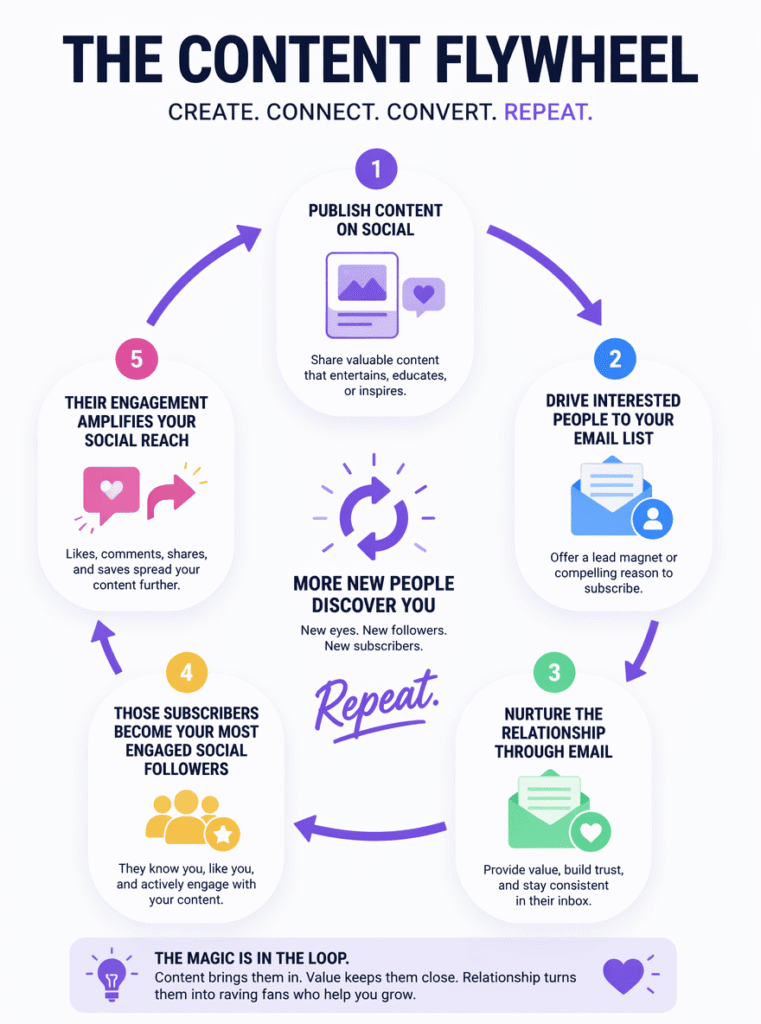
Each turn of that loop builds something the algorithm cannot take away: a growing list of people who actively want to hear from you, on a channel you control.
Quick-Start Checklist
This week:
- [ ] Decide on one lead magnet you can create in a few hours
- [ ] Sign up for Kit free — no credit card, free up to 1000 subscribers
- [ ] Build your signup landing page (takes 20 minutes inside Kit)
- [ ] Write and activate your welcome email automation
- [ ] Update every social media bio with your signup link
This month:
- [ ] Write a 3–4 email welcome sequence inside Kit
- [ ] Mention your email list in your next four pieces of content
- [ ] Send your first broadcast to your growing list
- [ ] Survey your subscribers: ask what they most want help with
Ongoing:
- [ ] Send consistently — weekly or biweekly, whichever you can sustain
- [ ] Announce every new piece of content to your list first
- [ ] Remove unengaged subscribers every 90 days to keep your list healthy and deliverability strong
- [ ] Let open rates guide your content — write more of what gets opened
Frequently Asked Questions
How long does it take to build an audience from scratch?
Most creators reach their first 100 email subscribers within 30–60 days when actively promoting a lead magnet and signup link. The first 100 are the hardest. Growth typically accelerates after that as content compounds in search and existing subscribers share your work.
Should I focus on social media or email first?
Both, simultaneously — but with different goals. Social platforms drive discovery; email builds the relationship. Use social to grow, use email to retain. They strengthen each other rather than compete.
What if I have nothing to sell yet?
Start building your list anyway. An email list built before you have a product gives you a warm audience to launch to when you’re ready. Creators who sell out launches spent the previous months building relationships with their list, not scrambling to find buyers at launch time.
How often should I email my list?
Consistency matters more than frequency. A weekly email you reliably send is worth more than a daily one you burn out on after three weeks. Start with whatever cadence you can genuinely sustain.
Is Kit free to use?
Kit’s Newsletter plan is completely free for up to 1000 subscribers with no credit card required. You get unlimited email broadcasts, unlimited landing pages and forms, one automation sequence, and the ability to sell digital products directly through the platform. Read our full Kit review for deeper detail.
Can I take my email list with me if I ever switch platforms?
Yes. Your email list is always exportable as a CSV file. You own the data regardless of which platform manages it — something that is fundamentally impossible with social followers.
Ready to build the audience you actually own? Start your free Kit account here → — no credit card, free up to 1000 subscribers.